
Choosing the Right Power Wheelchair Joystick: 2026 Guide
Table of Contents
- Start With a Real Assessment, Not a Guess
- Power Wheelchair Joystick Types and How They Drive
- Power Wheelchair Controls for Limited Hand Strength
- Alternative Power Wheelchair Controls When a Joystick Won't Work
- Wheelchair Joystick Positioning and Handle Choices
- Programming Settings That Change How the Chair Feels
- Step-by-Step Selection and Trial Process
- Frequently Asked Questions
Last Updated: October 7, 2026
Start With a Real Assessment, Not a Guess
Choosing the right power wheelchair joystick starts with proper assessment, not guesswork. Get the assessment wrong and no amount of programming will fix it. Get it right and the chair feels like an extension of your arm.
Assessment usually involves an occupational therapist or a wheelchair services clinician. They look at hand strength, range of motion, vision and thinking speed.
What to Test Before You Commit
Before you commit to any joystick, test these basics:
- Can you grip and release the handle without fatigue?
- Can you push the stick forward and pull it back smoothly?
- Can you hold a steady speed without jerking?
- Can you stop quickly and accurately?
If any answer is no, a different control type may suit you better. That is normal, and it is exactly what an assessment is for.
Power Wheelchair Joystick Types and How They Drive
Most power wheelchair joysticks use proportional control. That means the further you push the stick, the faster the chair moves. Push a little, you creep. Push a lot, you accelerate.
This is different from switch control, which works more like on and off. Proportional control gives smoother, more natural driving, which is why it is the standard option on most chairs.
Proportional Control and What Deflection Actually Does
Deflection is how far the joystick moves from its centre position. A small deflection gives slow movement. A large deflection gives fast movement. The controller reads that angle many times per second and adjusts motor power to match.
Key settings that change the feel:
- Sensitivity: how quickly the chair responds to small movements
- Acceleration: how fast the chair picks up speed
- Deceleration: how fast it slows when you release the stick
- Turning response: how sharply the chair turns
Small changes here can transform a chair from twitchy to calm. We often find users blame the joystick when the real issue is a setting.
Power Wheelchair Controls for Limited Hand Strength
Limited hand strength does not rule out a joystick, but it does change which one you need. Standard joysticks need a firm grip and steady wrist control. If that is difficult, there are other routes.
Options worth discussing with your clinician:
- Micro joysticks need very little movement and light touch
- Compact joysticks suit smaller hands or limited reach
- Golf-ball style handles give a rounder grip that is easier to hold
- Lighter spring tension reduces the effort needed to move the stick
For users with weak grip or arthritis, a shaped handle often makes more difference than a different joystick. Our Golfball Joystick Handle for Electric Wheelchairs is a simple, low-cost upgrade at £12.99 that many customers fit themselves in seconds.

Alternative Power Wheelchair Controls When a Joystick Won't Work
Sometimes a joystick is not the right answer at all. If hand control is very limited, or if tremor makes steady movement hard, alternative controls can work better.
Common alternatives include:
- Switch control: press buttons or pads to move in set directions
- Head control: a head array or chin stick steers the chair
- Sip-and-puff control: gentle breath pressure drives the chair
- Chin control: a small joystick operated by the chin
These take longer to learn. They also often need a specialist assessment to set up correctly.
Golfball Joystick Handle for Electric Wheelchairs →
A carer control is another option for shared use. Our Carer Control Accessory for Electric Wheelchairs fits to either side and works with several of our models.

Wheelchair Joystick Positioning and Handle Choices
Wheelchair joystick positioning matters as much as the joystick itself. The control should sit where your hand rests naturally, without you having to lean or stretch.
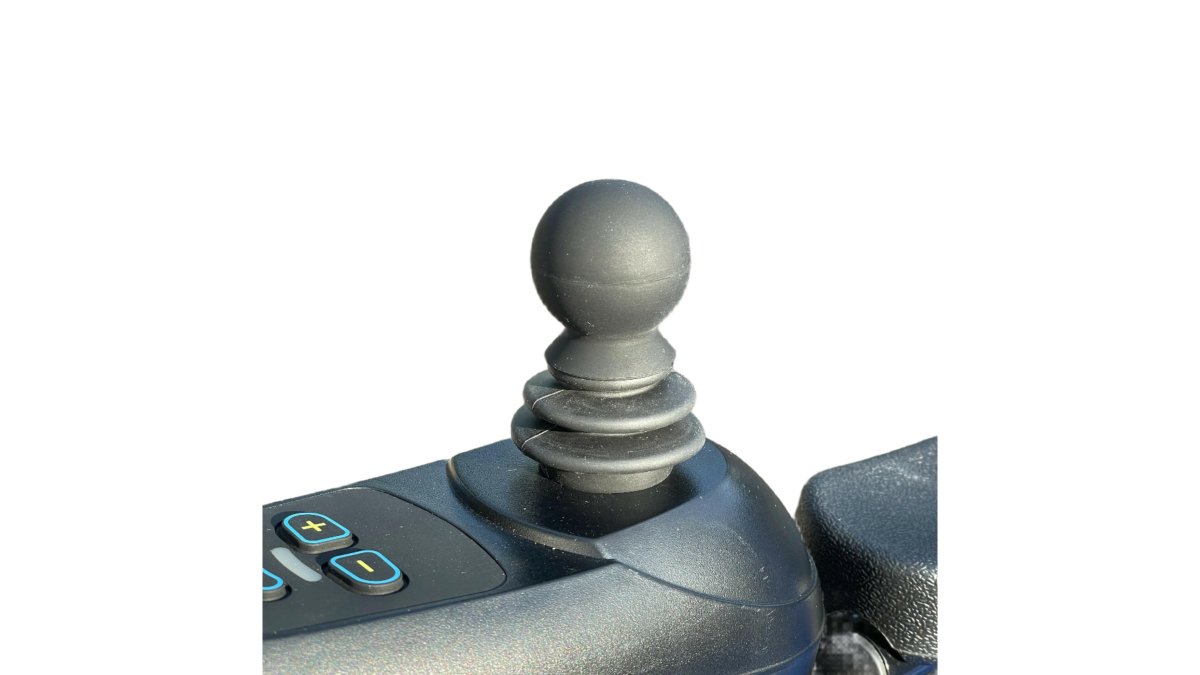
Most joysticks mount to the armrest. The mount can usually move forward, back, up and down. Getting this right reduces strain and improves control accuracy.
Handle choice is the other half of the puzzle:
| Handle Type | Best For | Notes |
|---|---|---|
| Standard ball | Most users | Simple, familiar grip |
| Golf-ball style | Weak or painful grip | Rounder shape, easier to hold |
| Extended handle | Limited reach | Brings control closer to hand |
| Shaped or themed topper | Personal preference | Adds grip and personality |
We stock a range of joystick toppers and handles designed to fit standard shafts. Small changes here often make the biggest daily difference.

Programming Settings That Change How the Chair Feels
Programming turns a good joystick into a great one. Modern controllers let a technician tune how the chair responds, and these settings can be adjusted over time as your needs change. The key is knowing what each setting actually does, so you can describe the problem in plain terms rather than guessing at numbers.
What Each Setting Actually Changes
- Maximum speed (forward and reverse). Usually set as a percentage of the controller's top speed. A common approach is to cap indoor profiles at around 50-60% and keep a separate outdoor profile nearer 80-100%. Reverse is often limited to roughly half of forward speed for stability.
- Acceleration. How quickly the chair reaches the speed you have asked for. Low values feel gentle and predictable; high values feel responsive but can lurch. New users often start low and increase once confidence builds.
- Deceleration. How quickly the chair slows when you ease the stick back to centre. Too aggressive and the chair nose-dives; too soft and it coasts further than expected near furniture.
- Turning speed and turn acceleration. Separate from forward speed, so a chair can be brisk in a straight line but gentle in a tight kitchen. Many controllers let you set turning independently for left and right, which matters if one arm is stronger.
How to Evaluate Whether a Setting Feels Safe
A useful test is to drive the same short route three times, once at your normal pace, once deliberately slowly, and once stopping at a marked point. If you overshoot the stop, the deceleration or braking is too soft. If you cannot creep up to a doorway without lurching, the dead zone or low-speed gain needs attention. If turning into a tight space feels like a gamble, reduce turning speed before reducing forward speed.
What to Ask Your Technician
- Can I have separate indoor and outdoor profiles?
- Can turning speed be set independently from forward speed?
- Can the dead zone be widened to stop unintended movement?
- Can the maximum speed be capped while I build confidence, then raised later?
- Will these settings survive a battery change or controller service?
A common mistake is leaving factory settings untouched. Many users live with a chair that feels too fast or too twitchy when a fifteen-minute adjustment would fix it. Equally common is a chair programmed once and never revisited, even after the user's strength or confidence has changed.
Step-by-Step Selection and Trial Process
Most guides list factors. This one gives you a process you can actually follow, including where to trial the chair and who should be involved at each stage.
Who Does What
Choosing a joystick is a shared decision, but the user's lived experience should carry the most weight. A useful division of roles:
- You (the user). You know which routes you take, where you get stuck, and what feels tiring. Your preferences should not be overruled by what is easiest to supply.
- Occupational therapist or wheelchair clinician. Assesses hand function, range of motion, vision, seating posture and thinking speed, and can recommend control types that match your abilities.
- Seating specialist or rehabilitation engineer. Handles mounting position, handle adaptations and any custom hardware.
- Supplier or technician. Programs the controller, fits accessories, and can make adjustments during a trial.
- Carer or family member. Useful for spotting fatigue or errors you may not notice yourself, and for learning how any carer control works.
The Process
- Get a professional assessment. Ask your occupational therapist or wheelchair clinician to review hand function, vision, seating and thinking skills. Bring a list of the tasks that are currently difficult.
- Map your real routes. Walk (or wheel) your typical day and note doorways, kerbs, ramps, shop aisles, lifts, and how the chair is stored and transported. Measure the narrowest gap you need to pass through.
- Shortlist two or three control types. Include a standard proportional joystick and at least one alternative such as a micro joystick, switch control or head control.
- Trial each option in more than one environment. At minimum, test indoors on carpet and hard flooring, outdoors on a pavement with a slight camber, and through a doorway. A smooth showroom floor hides problems.
- Adjust settings during the trial, not after. Ask the technician to change sensitivity, speed and dead zone while you are driving, so you can feel the difference immediately.
- Test handle options under real grip conditions. Try a golf-ball handle or shaped topper while wearing the gloves or splints you normally use.
- Check mounting position. The joystick should sit where your hand falls naturally, without leaning or stretching. Test it after a full day, not just a few minutes.
- Review after a week of real use. Note what felt easy, what caused fatigue, and where mistakes happened. Take those notes back to your clinician or supplier.
Trial Conditions That Actually Reveal Problems
- Tight doorways and turns. Reveals whether turning speed and dead zone are set sensibly.
- Carpet versus hard floor. The same speed setting can feel very different on each.
- A slight camber or uneven pavement. Shows whether the chair tracks straight or drifts.
- A ramp or kerb. Tests braking and low-speed control.
- Loading into a car boot or hallway. Reveals whether the joystick or mount catches on anything.
Common Mistakes to Avoid During a Trial
- Trialling only on smooth indoor floors
- Skipping the handle swap because it "looks fine"
- Ignoring fatigue that builds over an hour
- Not testing emergency stops
- Accepting factory settings without asking for changes
If you are weighing up a powerchair against a lightweight manual chair, our team can talk you through the differences based on how you actually live. Every Etech Mobility chair ships with free delivery, and our carbon fibre range is built to be lifted and stored without a struggle.
Frequently Asked Questions
What are the different types of joysticks available for power wheelchairs?
Most powerchairs use a standard proportional joystick, where pushing the stick further from centre increases speed. Beyond that you get compact and micro joysticks for smaller hands or shorter reach, plus specialty options such as head, chin, sip-and-puff and switch control. Handle shape matters too: a golf-ball handle suits a weaker grip better than a thin shaft, because the rounded top gives more surface to push against without needing to close the fingers tightly.
How do I choose a joystick for limited hand strength?
Start by testing how long you can hold and push a standard stick without fatigue. If grip strength or fine motor control is the limiting factor, try a larger handle such as a golf-ball topper, reduce the spring tension if the controller allows it, and lower the sensitivity so small movements do not translate into sudden acceleration. A compact joystick with a shorter throw can also help if your range of motion is reduced. Trial each option on a real chair before deciding.
Can a power wheelchair joystick be adjusted for comfort?
Yes. The joystick can usually be moved along the armrest, angled, and set closer to or further from your body, and the handle itself can often be swapped. Programming also changes how the chair responds: acceleration, deceleration, turning response, forward speed and braking can all be tuned. Adjust positioning first, because a controller that sits at the wrong height or angle will feel wrong no matter how the software is set up.
What alternatives are available if I cannot use a standard joystick?
Alternative power wheelchair controls include head arrays, chin controls, sip-and-puff, and switch control operated by a finger, hand, knee or head. A carer control accessory is another option, letting a companion take over steering on a day out while you keep your own joystick. The right choice depends on which movements you can repeat reliably and comfortably, so an assessment with an occupational therapist or wheelchair clinician is worth arranging before you buy.