
Electric Wheelchair Battery Replacement Guide
Table of Contents
- Before You Start: Safety and Compatibility Checks
- How to Remove an Electric Wheelchair Battery
- Choosing the Right Replacement Battery for Your Chair
- Installing Your New Battery
- How to Charge a Power Wheelchair Battery
- Electric Wheelchair Battery Cost and Value
- Electric Wheelchair Battery Lifespan and Maintenance
- Troubleshooting After Battery Replacement
- Frequently Asked Questions
Last Updated: October 10, 2026
Before You Start: Safety and Compatibility Checks
Before ordering an electric wheelchair battery replacement, verify three critical details: your chair's voltage, the amp-hour rating, and your current battery's physical dimensions.
Most electric wheelchairs use 24V or 12V systems. Check your existing battery or manual to confirm which. Amp-hours (Ah) determine range: a 12Ah battery offers less range than a 20Ah model but weighs less.
Always turn off your wheelchair and disconnect the charger before touching the battery to prevent electrical shock and control system damage.
Check your battery compartment location in your user manual. If you can't find it, contact the manufacturer before proceeding.
How to Remove an Electric Wheelchair Battery
Start by locating the battery compartment cover. Most models use a latch or screws. Open or remove the cover completely.
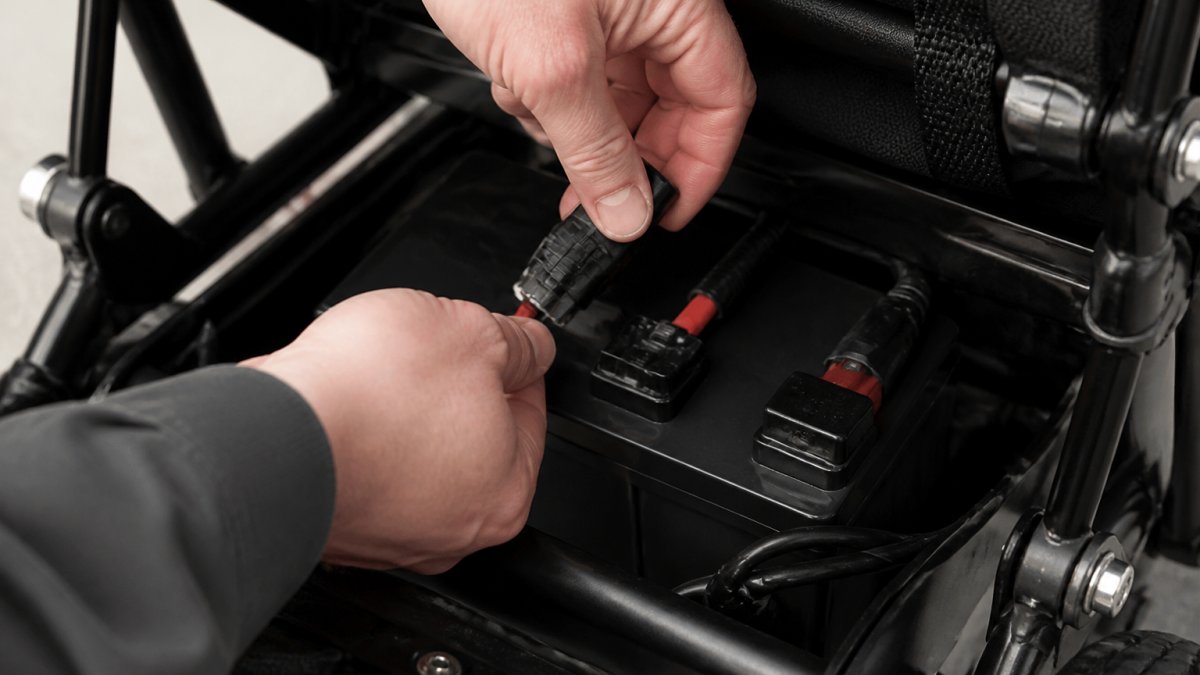
Locate the power connector (typically marked F1 and F2, or a plug-and-socket design). Gently disconnect by pulling straight out. Don't twist or force it.
If your battery sits on a removable tray, lift it out. If fixed in place, remove any straps or brackets. Some newer models feature batteries that slide out smoothly without tools.
Lift the battery straight up using both hands. Set it on a flat surface away from moisture.
Choosing the Right Replacement Battery for Your Chair
Your replacement battery must match five critical specifications to ensure compatibility and safety.
The Five-Point Compatibility Checklist
1. Voltage
Most electric wheelchairs use 12V or 24V systems. Check your current battery's label or manual for exact voltage. Voltage mismatch is the most common reason for battery replacement failure.
2. Amp-Hours (Capacity)
Amp-hours measure energy storage. Check your current battery's Ah rating and match it, or upgrade to higher capacity if your compartment has space and the charger supports it.

3. Physical Dimensions
Measure your current battery's length, width, and height in centimetres and compare to replacement specifications. Check weight too: lithium-ion batteries weigh 30-40% less than AGM for the same capacity.
4. Terminal Type and Polarity
Check your current battery's terminal type: F1 and F2 posts, two-pin connector, or three-pin connector. Your replacement must match exactly. Polarity matters, positive to positive, negative to negative.
5. Battery Chemistry
Two battery chemistries dominate electric wheelchairs: AGM (absorbed glass mat) and lithium-ion.
Lithium-ion batteries offer consistent power output. Note: lithium-ion batteries over 100Wh may be restricted on aeroplanes.
Before You Buy: A Quick Reference Table
| Specification | Where to Find It | What to Match |
|---|---|---|
| Voltage | Current battery label or chair manual | Exact match (e.g., 24V to 24V) |
| Amp-hours | Current battery label | Same or higher (e.g., 12Ah to 12Ah or 20Ah) |
| Length, width, height | Current battery or manual | Must fit in compartment |
| Terminal type | Current battery visual inspection | F1/F2 posts or connector plug type |
| Chemistry | Current battery label or manual | AGM or lithium-ion (check charger compatibility) |
Installing Your New Battery
Slide the new battery onto the tray (if removable) or into the compartment, aligning terminals correctly. Connect the power cable firmly until it clicks. Replace straps or brackets, close the cover, and turn on the wheelchair. If nothing happens, check the connector, loose connections are the most common issue. (Source: Consumer Rights Act 2015)
24V 12Ah Lithium-ion Battery for V2 Freedom Pro and Elite Powerchair →
How to Charge a Power Wheelchair Battery
Use the charger that came with your wheelchair. Plug into wall outlet first, then connect to the charging port. Expect 4-6 hours for lithium-ion, 8-12 hours for AGM. Charge when battery drops to 20% capacity; avoid complete drain.
| Charging Task | Recommended Frequency | Time Required |
|---|---|---|
| Full charge from 20% | Daily or as needed | 4-6 hours (lithium-ion) |
| Overnight charging | Avoid regularly | 8-12 hours (AGM) |
| Weekly maintenance charge | Once per week | 2-3 hours |
| Seasonal storage charge | Before long storage | 6-8 hours |
Electric Wheelchair Battery Cost and Value
Etech Mobility's lithium-ion batteries start at £199.99 (24V 12Ah) and £299.99 (24V 20Ah).

If you travel frequently by air, verify that your replacement battery meets airline regulations. Lithium-ion batteries over 100Wh (watt-hours) may be restricted. Etech Mobility's 12Ah models are 288Wh, so check with your airline before flying.
Electric Wheelchair Battery Lifespan and Maintenance
Most electric wheelchair battery replacement units last 3-7 years. Extend lifespan by charging regularly, keeping the battery dry, and avoiding extreme temperatures. Check terminals monthly for corrosion and clean gently with a dry cloth. Dispose responsibly through retailers or Etech Mobility's recycling guidance.
Troubleshooting After Battery Replacement
Before troubleshooting, perform a post-installation verification checklist. Many apparent problems are actually incomplete installation steps or uncharged batteries.
Post-Installation Verification (Do This First)
Step 1: Visual Inspection, Power off and open the battery compartment.
Step 2: Initial Power-On Test
Turn on the wheelchair. The display should light up within 2-3 seconds. Listen for any beeping or error codes.
- Display lights up normally: Installation was successful. Proceed to charging.
- Display does not light up: Power off immediately. Check the connector again (Step 1). If the connector is fully seated and the display still doesn't light, the battery may be completely discharged. Proceed to charging.
- Display shows an error code: Note the code. Consult your chair's manual for that specific code. Most error codes relate to loose connections rather than battery failure. Power off, reseat the connector, and try again.
Step 3: Charging the New Battery
Plug the charger into a wall outlet first, then connect it to your battery's charging port. Most wheelchairs have a dedicated charging socket separate from the power connector.
Expect these charging times for a fully discharged battery:
- Lithium-ion: 4-6 hours for a full charge
- AGM: 8-12 hours for a full charge
Do not use the wheelchair while charging. Once charging is complete, the charger light will change colour (usually from red to green) or the charger will beep. Unplug the charger.
Step 4: Second Power-On and Range Test
After a full charge, turn on the wheelchair again. The display should show a full or near-full battery indicator.
Take a short test drive in a safe, open area (e.g., a car park or garden). Drive forward, backward, and turn in both directions. The wheelchair should respond normally to all controls.
- Wheelchair responds normally: Installation is complete and successful.
- Wheelchair feels sluggish or underpowered: Continue normal use and charging.
- Wheelchair cuts out or loses power during the test drive: Power off immediately. The battery may not be fully charged, or the connection may be loose. Return to Step 1 and reseat the battery and connector.
Common Problems and Solutions
| Problem | Likely Cause | Solution |
|---|---|---|
| No power after installation | Loose connector or completely discharged battery | Disconnect and reconnect the power cable firmly. Ensure the connector clicks. Charge the battery fully (4-12 hours depending on chemistry). |
| Display lights up but wheelchair won't move | Battery not fully charged or control system needs reset | Charge the battery for at least 2 hours. If still no movement, power off the wheelchair for 30 seconds, then power on again to reset the control system. |
| Sluggish performance or reduced range | Battery not fully charged or new battery requires break-in cycles | Run a complete charge cycle. If range is still poor after 5 cycles, the battery may be defective. |
| Cuts out during use | Battery not seated properly in compartment | Power off immediately. Open the battery compartment and reseat the battery firmly. Push it in until it clicks or seats fully. Close the compartment and try again. |
| Charging takes much longer than expected | Wrong charger type or charger malfunction | Verify you're using the correct charger (check the label for voltage and amp output). Different battery chemistries require different charge profiles. Using an AGM charger on a lithium-ion battery will charge it slowly or not at all. If the correct charger is being used and charging is still slow, the charger may be faulty. |
| Wheelchair's display shows an error code | Loose power connection or control system error | Note the error code and consult your chair's manual for that specific code. Most error codes relate to loose connections. Power off, disconnect and reconnect the power cable firmly, and try again. If the error persists, contact the manufacturer. |
| Battery leaks or smells unusual | Battery damage or internal failure | Do not use the wheelchair. Power off immediately and do not attempt to charge. Contact the battery supplier or manufacturer. A leaking or damaged battery is a safety hazard and must be replaced. |
| Connector is damaged or won't insert | Connector pin misalignment or physical damage | Inspect the connector pins and the socket on the battery for bent pins or debris. If a pin is bent, do not force the connector. Contact the manufacturer for a replacement connector or battery. |
When to Seek Professional Help
If you have completed all four verification steps and the wheelchair still does not power on, or if you encounter any of the following, contact the manufacturer or a qualified wheelchair technician:

- Battery leaks, smells unusual, or shows visible damage
- Connector pins are bent or damaged
- Error codes persist after reseating the connector
- The wheelchair powers on but no controls respond (motor, joystick, brake)
- Charging takes longer than 12 hours even with the correct charger
- The battery becomes very hot during charging (warm is normal; hot is not)
Frequently Asked Questions
Can you replace an electric wheelchair battery yourself?
Yes, most users can replace an electric wheelchair battery themselves if they follow safety steps carefully. Always turn off the wheelchair before starting work. Disconnect the power connection first, then remove the battery from its compartment or tray. Installation is the reverse process: slide the new battery in place and reconnect the power connector. If your chair has a dual-power system or complex wiring, consult your manual or contact the manufacturer for guidance. Etech Mobility's lithium-ion batteries, such as the 24V 12Ah model for Freedom Pro and Elite powerchairs, are designed for straightforward removal and installation when the chair is powered down.
How much does a battery for an electric wheelchair cost?
Electric wheelchair battery prices vary by chemistry and capacity. Etech Mobility's 24V 12Ah lithium-ion batteries cost £199.99 and are airline-friendly, making them ideal for travel. The extra-range 24V 20Ah lithium-ion battery is £299.99 but exceeds airline capacity limits. Lithium-ion batteries typically cost more upfront than AGM or gel alternatives but last longer and require less maintenance. When choosing a replacement battery, confirm your chair's voltage and amp-hour requirements to avoid compatibility issues and unnecessary expense.
How long does an electric wheelchair battery last?
Lifespan depends on how often you use the chair, charging habits, and storage conditions. Avoid fully draining the battery before recharging, as this accelerates wear. Store your chair in a cool, dry place and charge after each use to maximise battery health. Signs your battery needs replacement include reduced range, longer charging times, or the chair losing power unexpectedly during use.
How do I know if the replacement battery will fit my wheelchair?
Check three key specifications: voltage (commonly 24V for powered wheelchairs), amp-hours (capacity, such as 12Ah or 20Ah), and physical dimensions. Measure your battery compartment or tray to ensure the new battery fits without forcing. Verify the terminal type and connector polarity match your chair's power connection ports. Review your wheelchair's manual or contact the manufacturer with the model number to confirm compatibility. For Etech Mobility chairs, the Freedom Pro and Elite models use specific battery designs; the V3 models accept batteries that slide in and out, while earlier versions may use different mounting brackets. Always double-check compatibility before purchasing to avoid returns and delays.